Post a Job to the Job Board
How It Works
When you subcontract a job, you can also post it to the job board, where other Jeero businesses can find it. You can post it on its own, or post it and send it to businesses you pick by name at the same time.
The board shows only what you write for it and a few facts about the work. It never shows your client, the street address, your notes, your forms, your photos or your prices.
What the board shows:
- Type of work you pick, such as Lawn care or Plumbing.
- Public title and public description you write.
- Task lines, started from the job’s own tasks. You can reword a line, change its quantity or leave it out. These changes are for the board only; your job doesn’t change.
- City and state of the job. Never the street or the ZIP code. On a map, the job shows as a spot somewhere between 0.3 and 0.9 miles from the real address.
- Visit dates, the pay you set (or your budget when the job is open to bids) and the day the offer closes.
- Your company name, with License on file and Insurance on file when your company profile has them. These are what you told us, not something Jeero checked.
Before You Can Post
- Plan. Posting is part of Pro (up to 5 open posts) and Business (up to 10). Enterprise has no limit. Each visit of an open offer counts as one post: an offer of 3 project visits uses 3. When an offer is accepted, canceled or closes, its posts are free again. A post hidden for review still counts. See Billing and Plans.
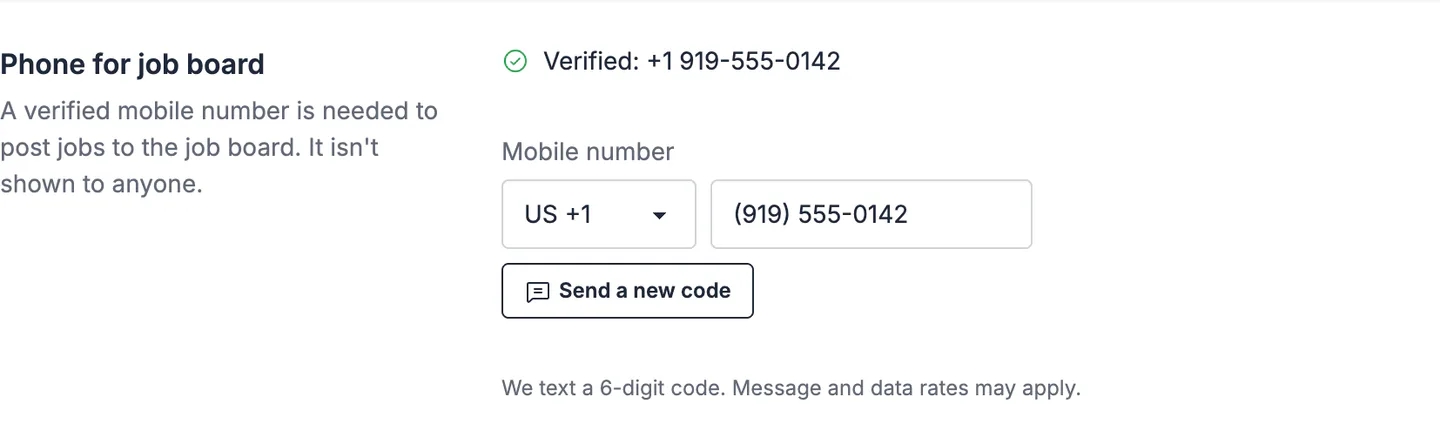
- Verified phone. The person posting needs a verified mobile number. Open My account, find Phone for job board, type your number and click Send code, then type the code from the text and click Verify. In the app, open More > Phone for job board.
- Company age. A company can post once its account is 14 days old.
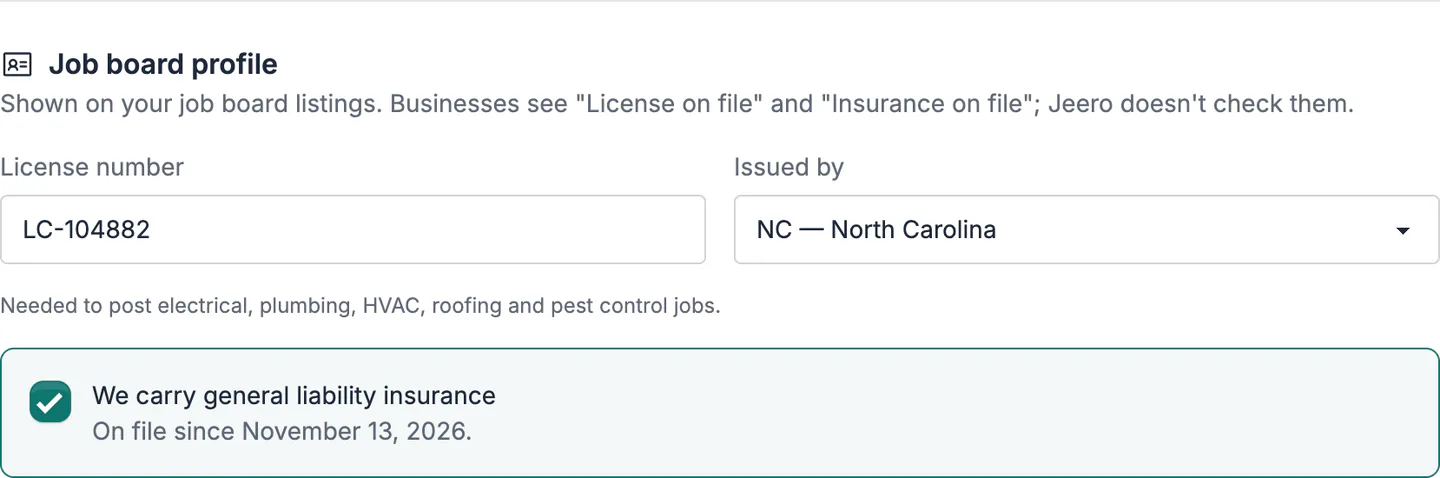
- License. Electrical, plumbing, HVAC, roofing and pest control jobs need a license on your company profile. Open My company, fill in License number and Issued by under Job board profile, check We carry general liability insurance if you do, and click Save changes. In the app, open More > Job board profile.
When something is missing, the Post to job board box says what, with Verify my phone or Open company profile to fix it.
Posting an Offer
- Open the job and click Subcontract job.
- Pick businesses in Send to if you want to, or leave it empty to post to the board only.
- Check Post to job board.
- Pick the Type of work, write a Public title (up to 80 characters) and a Public description (up to 1,000 characters).
- Check the Task lines. Uncheck a line to leave it out.
- Set the Pay and the Offer open until day as for any offer.
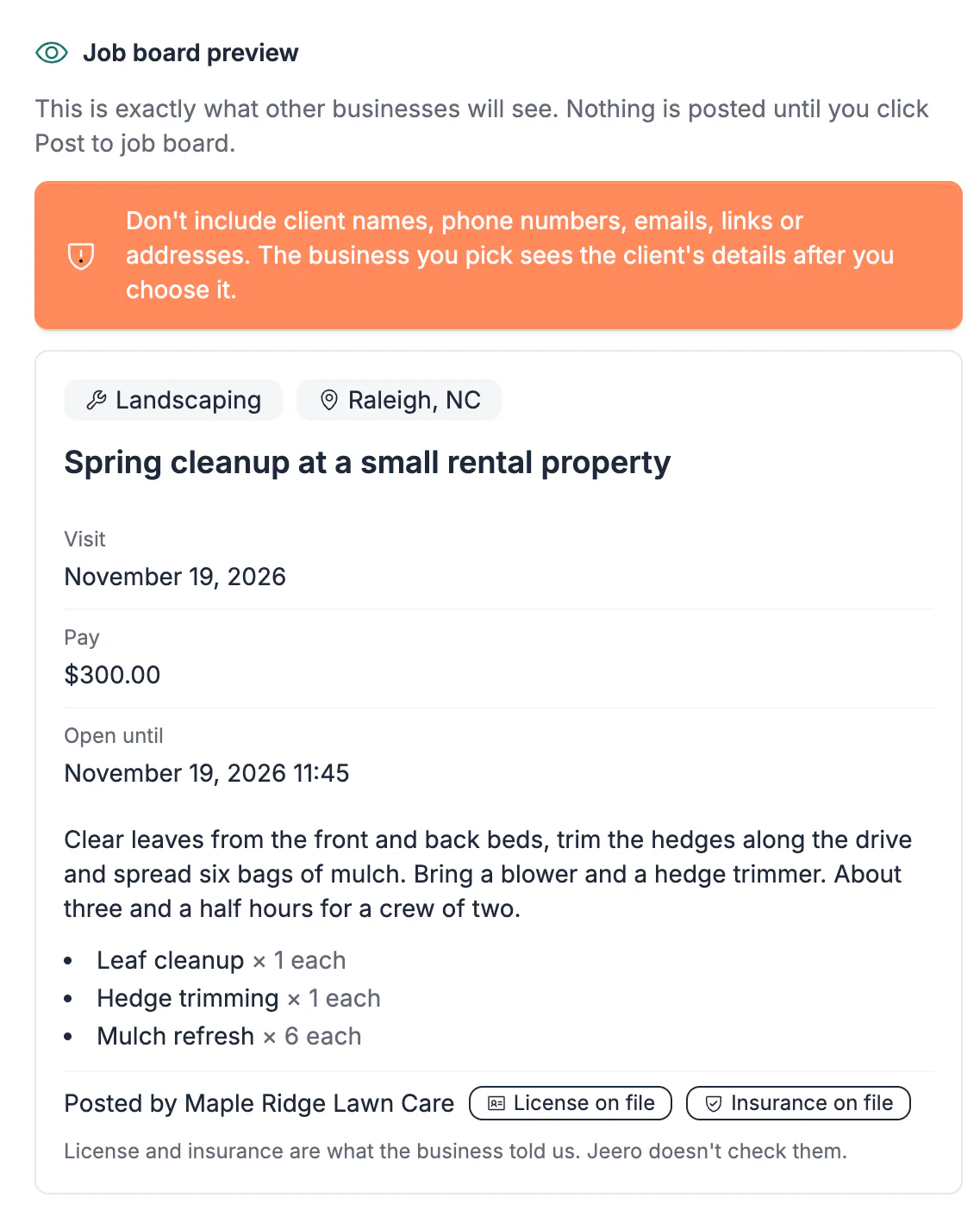
- Click Send offer. A preview shows the listing exactly as businesses will see it.
- Click Post to job board to post it, or click Edit to go back to the form and change something.
In the App
- Open the job and tap Subcontract job.
- Turn on Post to job board and fill in the same fields as on the web.
- Tap Preview listing. The Job board preview shows the listing as businesses will see it.
- Tap Post to job board, or Change something to go back to the form.
Keep Contact Details Off the Board
Phone numbers, emails, links, street addresses and your client’s name or details can’t go on the board. If the title, description or a task line has one, the post is refused and the part that was found is marked so you can take it out. You share contact details with the business you pick once it takes the job, so the deal stays on Jeero.
Posts also can’t state preferences about people’s gender, age, race, religion, national origin or disability, such as “men only” or “under 30”. Describe what the job needs instead. See Job Board Safety.
Opening a Job to Bids
Not sure what to pay? Let businesses name their price.
- On the Subcontract this job page, check Post to job board, then check Open to bids.
- Leave Send to empty. A job open to bids goes to the job board only.
- The Pay you type becomes your budget, shown on the listing as Open to bids · budget. Leave it blank to show no budget.
Each business that asks for the job enters its bid. Bids are private: only you see the amounts, and other businesses see only how many bids there are. A business can change its bid until you choose, and you hear about it when it does.
On the Subcontract offer card, Asked on the job board shows the five lowest bids. Click See all N bids (or Open offer) for the offer page, which lists every bid, lowest first, 20 to a page. Click Choose next to a business, on the card or the offer page, and confirm the amount. Its bid becomes the pay, and from then on the pay can’t change. If the business changed its bid while you were looking, you’re asked to check the new amount and choose again.
It works the same in the app. Jobs can’t be opened to bids in Japan, where a listing has to show the pay.
Choosing a Business
Owners and managers of other Jeero businesses can open your listing and click Ask for this job. Each one can add a short message and must agree not to contact or work for your client directly for 12 months, except through you. Messages can’t carry phone numbers, emails, links or addresses.
You hear about each request in the app, and when a business takes its request or bid back. To choose:
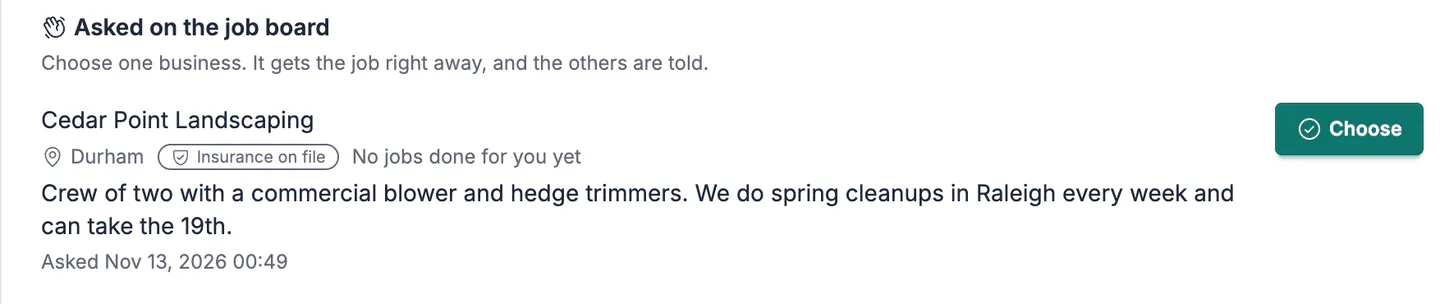
- Open the job. On the Subcontract offer card, Asked on the job board lists the first five businesses that asked, waiting ones first; click See all N requests (or Open offer) for the offer page, which lists every one, 20 to a page. Each shows its city, License on file and Insurance on file when it has them, how many jobs it already did for you, its message and when it asked.
- Click Choose next to the business you want, then confirm.
In the App
Owners and managers can choose from the app too. Tap the notification, or open the job. On the Subcontract offer card, Asked on the job board lists the businesses that asked, waiting ones first, with the same details. Tap See all for every one of them, on the offer’s own screen. Tap Choose next to the business you want, then tap Choose again to confirm. A business you chose from the board shows Job board next to its name on the card.
The business you choose gets the job right away, exactly as if it had accepted a link you sent: every visit the offer covers, with your crew taken off. The other businesses that asked are told you chose someone else, and anyone you sent the offer to by name is told it’s taken. Only an owner or a manager can choose.
If the offer is accepted from a link you sent, canceled, runs out or is withdrawn because the job changed, every business still waiting is told the job closed.
After Posting
- The job’s Subcontract offer card says On the board, with the listing’s title and how many bids or requests, unanswered questions, unread messages and photos it has. Click Open offer: its On the job board section shows the listing as businesses see it. Click Edit listing (then Save listing) to change the type of work, the title, the description or the task lines while the offer is open. The pay can’t change.
- On the Jobs list, the job shows On the board. Pick On the board in the Subcontracting filter to list them.
- Under Subcontracts, Sent, the offer shows On the board on the Offered tab.
- When you move a visit, the dates on the board follow. When you change the job’s property address, the city and the spot on the map follow.
- Canceling the offer, or the offer closing or being accepted, takes the listing off the board.
- If three businesses report your post, it’s hidden for review: the Subcontract offer card says Hidden for review and the post can’t be edited until we decide. See Job Board Safety.
Questions and Messages
Businesses can ask public questions under your post and write to you in private. See Questions and Messages on the Job Board.
Paying the Business You Pick
You pay the business that does the job yourselves; Jeero doesn’t move money between businesses. You may owe it a Form 1099-NEC. See Taxes When You Subcontract.