Location & GPS Tracking
Overview
Jeero records where your field crews are through the mobile app, and shows owners and managers their latest positions on the Crew locations map. GPS tracking is part of the Pro and Business plans, and is available during your trial. On Starter the Crew locations map and the GPS tracking mode setting are hidden and the app records no crew locations.
GPS Tracking Modes
Owners and managers set GPS tracking mode on My company > Scheduling & field work (see Company Setup). It applies to the whole company:
- Continuous – the default. The app records the crew member’s location from clock-in to clock-out, plus a point at each job status change.
- Manual – the app records a single point at clock-in, at clock-out, and each time a job’s status changes (for example on my way, start, finish).
- Disabled – no crew location is recorded: nothing for the map, and no point on a job status change. Job photos still record where they were taken (see below).
Raw location points are deleted automatically after 90 days. The location saved with a job status change and with a job photo is kept with that job or photo – it is deleted when the job, the photo or your company is deleted.
How Tracking Works on the Mobile App
Location is recorded only by the Jeero mobile app on each crew member’s phone. The app asks for location permission the first time it needs it. A crew member can decline; the app keeps working, but they will not appear on the map.
In Continuous mode the app also asks for background (“all the time”) location access, so it can keep recording while the phone is locked or the app is closed. The phone shows that tracking is active, and tracking stops at clock-out. Points recorded without a connection are sent once the phone is back online.
With background location allowed, the app can also remind a crew member to clock in when they arrive at a job site. Each person can turn this off under Job site reminders in their notification settings.
The Crew Locations Map
Owners and managers open Crew locations from the sidebar on the web, or from the More tab in the mobile app. The map shows:
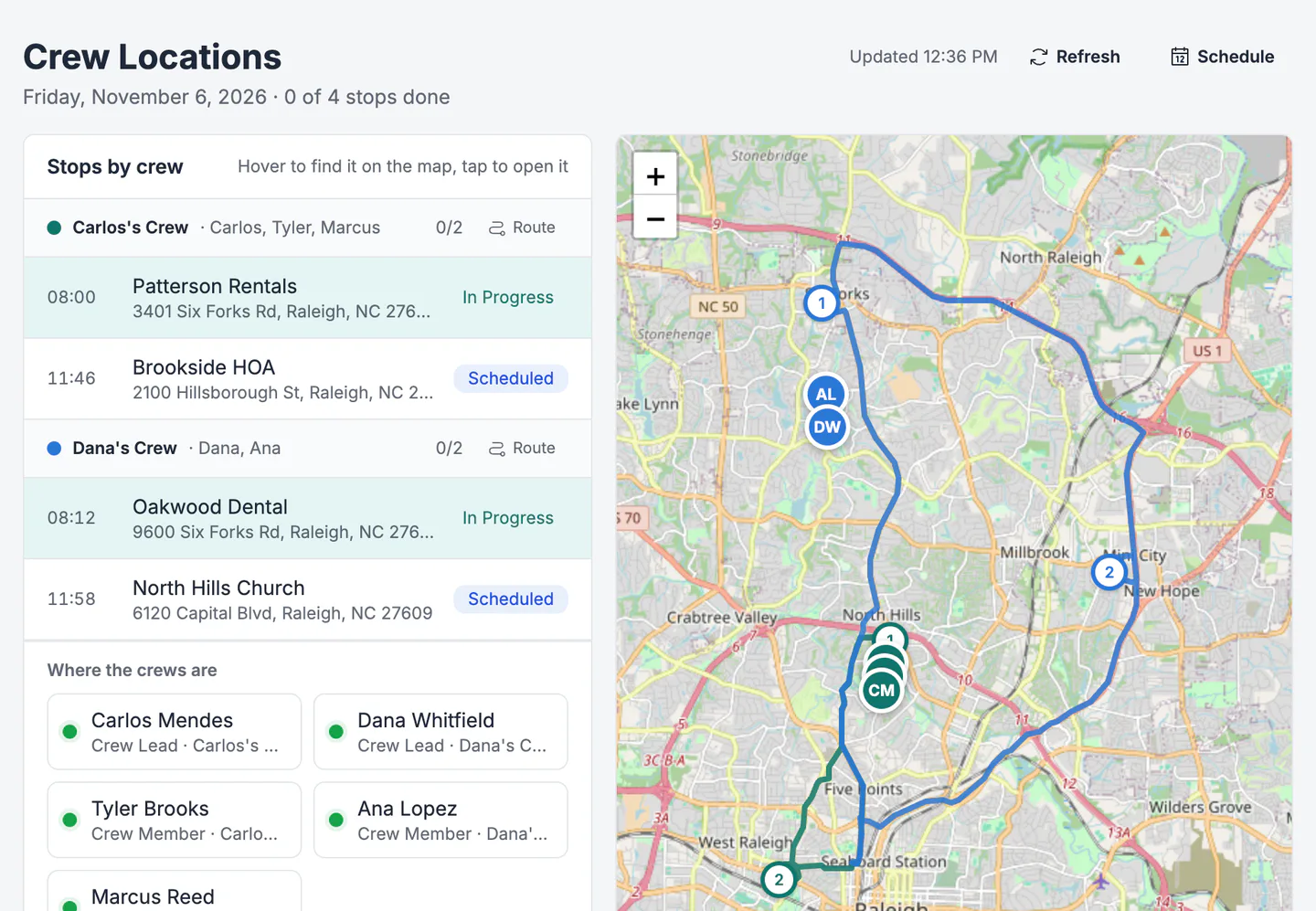
- Everyone who works in the field – crew leads, crew members, and owners or managers with a field role – with a location recorded in the last 24 hours: their name, role, crew, how long ago the location was recorded, and whether they are Clocked in or Clocked out.
- Today’s stops for each crew, and the route line for crews whose route has been built (see Route Optimization).
Positions refresh every minute. On the web, Refresh reloads them on demand; in the mobile app, pull down to refresh and tap Fit all to bring everything back into view. Select a person under Where the crews are to move the map to them.
Location and Mileage
GPS is not used for mileage. Mileage is the planned driving distance between a crew’s jobs, so it is the same whether tracking is Continuous, Manual or Disabled. See Mileage Tracking for how distances are worked out.
Location on Job Photos
Each job photo taken in the app records where it was taken, when the phone provides a location. This does not depend on the GPS tracking mode or on Geofence enforcement, and it is what Proof of Visit shows the customer.
Proof of visit and its photo geofence are part of the Pro and Business plans. When Geofence enforcement is on (the default), the app checks where each job photo is taken. A photo taken outside the radius around the job site (100 meters by default), or with no location available, is flagged and raises a Photo geofence violation alert. The app warns the crew lead before such an upload, but never blocks it. The settings are in Company Setup; the alert is covered in Notifications & Alerts.
Location Rules Template for Japan
A company in Japan that uses GPS tracking should set out in its work rules (就業規則) what is collected, why and who can see it, and tell its crew before turning tracking on, as Japan’s Personal Information Protection Commission asks (Q&A 5-7). The Japanese version of this article has a template to adapt and paste into your work rules or a separate policy. In English it reads:
Article X (Collecting and Using Location)
- Through the Jeero app, the company collects the location of an employee’s device only from clock-in to clock-out. It collects none after clock-out or on days off.
- The company uses the location only to dispatch and schedule work, record arrival and work at job sites, and check on safety in an emergency, and for no other purpose.
- Only the company’s owners, managers (dispatchers) and the person responsible for location data can see it. The person responsible is the [job title].
- Continuously collected location is deleted automatically 90 days after it is collected. Location attached to job records and photos is kept with those records.
- An employee can refuse or withdraw location permission in their device settings, and can still use everything else in the app.
- The company checks regularly that this article is followed, and explains any change to employees in advance.
This is not legal advice. A labor and social security attorney (社会保険労務士) can help fit it to your company.